|
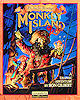
Monkey Island 4
Escape from Monkey Island
Die Flucht von Monkey Island |
|
 |
System
Language
Protection
CD Cover |
: PC
: 
: CD-Checks
: Cover Target |
 |
|
File Archive [1.4 MB] |
|
|
Play Instructions:
- Install the game - Complete Installation.
- Apply the included official Escape from Monkey Island v1.1 Patch.
- Replace the original <GameDir>\MONKEY4.EXE & <GameDir>\TEXTURES\FULLMONKEYMAP.IMT files with the ones from the File Archive.
- Play the Game!
|
|
|
|
File Archive [333 KB] |
|
|
Play Instructions:
- Install the game - Full Installation.
- Apply the official Escape from Monkey Island v1.1 Patch.
- Replace the original MONKEY4.EXE file with the one from the File Archive.
- Execute/Double-Click the NOCD.REG file to update the windows registry.
- Play the Game!
|
|
|
|
File Archive [379 KB] |
|
|
File Archive [29 KB] |
|
|
Play Instructions:
- Install the game - Full Installation.
- Apply the official Escape from Monkey Island v1.1 Patch.
- Remove the following directories:
- <GameDir>\MOVIES
- <GameDir>\TEXTURES
- Create the following directories:
- <GameDir>\MONKEY4
- <GameDir>\MONKEY4\MONKEYDATA
- Copy the MOVIES directories from CD#1 & CD#2 to the <GameDir>\MONKEY4\MONKEYDATA directory.
- Copy the TEXTURES directories from CD#1 & CD#2 to the <GameDir>\MONKEY4\MONKEYDATA directory.
- Extract the MI4_11.EXE executable from the File Archive to the game directory.
- Extract the REGSETUP.EXE file from the File Archive to the game directory.
- Execute the Patch to remove the CD-Check.
- Execute the REGSETUP.EXE file to update the windows registry.
- Play the Game!
|
|
|
|
File Archive [379 KB] |
|
|
Play Instructions:
- Install the game - Full Installation.
- Remove the following directories:
- <GameDir>\MOVIES
- <GameDir>\TEXTURES
- Copy the following directories from CD#1 & CD#2 to the game directory:
- <CD#1>\MONKEYDATA
- <CD#2>\MONKEYDATA
Do not copy the *.M4B files as this saves some precious diskspace!
- Apply the official Escape from Monkey Island v1.1 Patch.
- Extract the MI4_11.EXE & MI4_11.REG files from the File Archive to the game directory.
- Execute the Patch to remove the CD-Check.
- Double-Click/Import the MI4_11.REG file to update the windows registry.
- Play the Game!
|
|
|
|
File Archive [390 KB] |
|
|
Play Instructions:
- Install the game - Full Installation.
- Apply the official Escape from Monkey Island v1.1 Patch.
- Extract the File Archive to the game directory - Overwriting existing files
- Move the A B C D S folders from <GameDir>\TEXTURES\SPAGO - for high quality
sound; or <GameDir>\TEXTURES\MEGO - for normal quality to the root of the game directrory.
- Remove the <GameDir>\TEXTURES directory to save some diskspace.
- Execute the MI4V1.1-NOCD.EXE Patch to remove the CD-Check from: MONKEY4.EXE
- Double-Click/Import the MI4.REG file to update the windows registry.
- Execute MONKEY4.EXE to play the Game!
|
|
|
|
File Archive [12 KB] |
|
|
Play Instructions:
- Install the game - Full Installation.
- Extract the MI4GERNOCD.EXE Loader from the File Archive to the game directory.
- Execute the Loader to play the Game!
|
|
|
|
File Archive [15 KB] |
|
|
Play Instructions:
- Install the game - Full Installation.
- Remove the following directories:
- <GameDir>\MOVIES
- <GameDir>\TEXTURES
- Copy the following directory from CD#1 & CD#2 to the game directory:
- <CD#1>\MONKEYDATA
- <CD#2>\MONKEYDATA
Do not copy the 8 *.M4B files as this saves about 324 MB of precious diskspace!
- Extract the MI4PATCH.EXE & MI4PATCH.REG files from the File Archive to the game directory.
- Execute the Patch to remove the CD-Check.
- Double-Click/Import the MI4PATCH.REG file to update the windows registry.
- Play the Game!
|
|
|
|
File Archive [12 KB] |
|
|
Play Instructions:
- Install the game - Full Installation.
- Extract the MK4NOCD.EXE Loader from the File Archive to the game directory.
- Execute the Loader to play the Game!
|
|
|
|
File Archive [413 KB] |
|
|
Play Instructions:
- Install the game - Full Installation.
- Apply the official Escape from Monkey Island v1.1 Patch.
- Replace the original MONKEY.EXE file with the one from the File Archive.
- Play the Game!
|
|
|
|
File Archive [14 KB] |
|
|
Play Instructions:
- Install the game - Full Installation.
- Apply the official Escape from Monkey Island v1.1 Patch.
- Extract the EFMI11CRK.EXE Patch from the archive to the game directory.
- Execute the Patch to remove the CD-Check.
- Play the Game!
|
|
|
|
File Archive [468 KB] |
|
|
CD-Copy Instructions:
- Create the following temporary directory:
- Copy the full contents of the original CD to TempDir.
- Replace the <TempDir >\MONKEY ISLAND4\MONKEY.EXE & <TempDir>\MONKEY4\MONKEYINSTALL\MONKEY4.EXE files with the one from the File Archive.
- Burn the contents of TempDir to a CD-R and use this CD-Label: MONKEY4_CD1
- Remove/Clear the TempDir.
- Play the game!
|
|
|
|
File Archive [3 KB] |
|
|
Play Instructions:
- Install the game - Full Installation.
- Extract the PATCH.EXE Patch from the archive to the game directory.
- Execute the Patch to remove the CD-Check.
- Play the Game!
|
|
|
|
File Archive [13 KB] - Music Fixed! |
|
|
Play Instructions:
- Install the game - Full Installation.
- Extract the MONKEY4NOCD.EXE Patch from the archive to the game directory.
- Execute the Patch to remove the CD-Check.
- Double-Click/Import the NOCD.REG file to update the windows registry.
- Play the Game!
|
|
|
|
File Archive [26 KB] |
|
|
Play Instructions:
- Install the game - Full Installation from CD#1 & CD#2 (~1.1 GB).
- Apply the official Monkey Island 4 v1.1 Patch.
- Extract the File Archive to the game directory - Overwriting existing files.
- Execute the MONKEY4CR11.EXE Patch to remove the CD-Check.
- Play the Game!
|
|
|
|
File Archive [26 KB] |
|
|
Play Instructions:
- Install the game - Full Installation from CD#1 & CD#2 (~1.1 GB).
- Extract the File Archive to the game directory - Overwriting existing files.
- Execute the MONKEY4CR100.EXE Patch to remove the CD-Check.
- Play the Game!
|
|
|
|
File Archive [468 KB] |
|
|
Play Instructions:
- Install the game - Full Installation.
- Replace the original MONKEY.EXE & MONKEY4.EXE executables with the one from the File Archive.
- Double-Click/Import the MI4.REG file to update the windows registry.
- Play the Game!
|
|
|
|